
What the Atlas shutdown actually covered
The timeline, and it was reasonable
OpenAI's help article is titled "Evolving Atlas into ChatGPT for browser-based agentic work," and states: "We're deprecating Atlas and moving browser-based agentic capabilities into ChatGPT and Codex." The wind-down was about 30 days — announced July 9, with Atlas scheduled to stop working August 9, 2026 — and the article is direct about why you shouldn't linger: browsers require ongoing security maintenance, and a discontinued browser stops receiving it.
Credit where it's due. That's a clear notice period, a named replacement path, and an honest security rationale. Most sunsets are worse.
Four artifacts, four different answers
The documentation is specific about what happens to each kind of browser data:
- Bookmarks don't transfer automatically. Export them from Atlas as an HTML file, then import into another browser such as Chrome — the article gives step-by-step instructions for both halves.
- Open tabs may not transfer automatically. Bookmark them or copy the URLs into a document.
- Browser history may not transfer automatically. Save or bookmark anything you'll need later.
- Cookies: "Atlas will provide export options where available," with a caution to treat cookie and session files as sensitive, and a flat statement in the troubleshooting section: "Cookies and active sessions cannot be imported into another browser."
Notice the pattern. Everything on that list is a file-shaped artifact — a URL, a bookmark, a cookie jar. Those are the things that have export formats, because browsers have had twenty years to standardize them.
Your conversations were explicitly safe
This is the reassuring part, and it's stated twice: "ChatGPT conversation history is separate from Atlas browser data. You can continue using ChatGPT conversations in ChatGPT, subject to your plan, workspace settings, and account access."
So the chats survived the browser. Which makes the omission sharper rather than softer, because it shows OpenAI thought carefully about which stores were affected and told you about each one.
The part the guidance doesn't mention
Browser memories were a real feature
They're documented in Atlas's own data-controls article, which opens by saying you control "what it remembers about you." The definition is precise: "Browser memories contain facts and insights from your browsing, but not full page content."
That's not history and it's not a cache. It's derived knowledge — the layer above your raw browsing, which is exactly what made it useful. It's also the reason it has no export format: nobody has ever standardized "what a tool concluded about you."
The only documented facts about their lifecycle are about deletion
Two sentences in the privacy documentation touch what happens to Browser memories, and both are about removal rather than portability:
- Deleting all chats "does not delete Browser memories, cookies, or other data specific to Atlas."
- "When you delete Web History, any associated Browser memories will also be deleted."
So Browser memories were coupled to browsing history for deletion purposes, and decoupled from chats. That's a coherent privacy design. It also means the only lever you were given over them was destructive.
What I'm not claiming
I don't know what happened to Browser memories at shutdown. The deprecation article doesn't say, and I'm not going to fill that silence with a guess — a product that says "conversations are separate and safe" in two places may well have handled it sensibly.
What's verifiable is narrower and still worth sitting with: an export path existed for bookmarks, partial paths existed for tabs and history, a caveated one existed for cookies, and no export path is documented for the derived layer at all. When a tool learns something about how you work, that knowledge lives in the tool's shape, not in a file format. Sunset the tool and the question of what happens to it isn't even in the FAQ.
And this is the norm, not an Atlas quirk
Every tool with a memory feature has this property right now. Consumer chat memory has no structured export. Coding agents' generated memories are local files not meant for hand-editing. Screen-activity tools compile to their own client's store — which is the whole shape of the episodic half of agent memory, where the record of what you actually did stays inside one product on one machine.
If a shutdown notice is the first time you think about it, you've already lost the option to act.
What people try
Exporting everything the article lists. Correct, and you should have. Bookmarks as HTML, tabs as a URL list, history reviewed for anything important. It's the recoverable set, and it's genuinely most of what people miss day to day.
Trying to move cookies and sessions. Documented as a dead end for import into another browser, and worth respecting rather than working around: session files are credentials in a trench coat, and the article's warning about not sharing them is the correct instinct.
Assuming ChatGPT memory absorbed the browsing knowledge. It didn't, and the docs draw the line: browser data and conversation history are separate stores. Whatever Atlas inferred from your browsing was Atlas-side.
Rebuilding by browsing the same sites again. This is what most people are actually doing, and it's the tell. If the fix for losing a knowledge layer is "recreate the behavior that produced it," the knowledge was never yours to move.
Switching to the desktop app or the Chrome extension and hoping. The recommended path, and reasonable — the article points to the ChatGPT desktop app for agentic browser work and the Chrome extension or sidebar for help alongside Chrome. New capabilities, new store, no import of the old derived layer.
Every workaround handles artifacts well and derived knowledge not at all.
The Fix: Keep Derived Knowledge Where You Can Export It
The lesson generalizes past Atlas, and it's not "distrust vendors." It's that there are two kinds of things a tool holds, and only one of them is yours in any practical sense.
Artifacts are portable. Bookmarks, files, URLs, documents. Standard formats, boring, exportable. Keep them somewhere standard and this class of problem never touches you.
Derived knowledge usually isn't. What a tool inferred, summarized, or concluded — about your work, your preferences, your patterns. It has no interchange format, so it has no migration path, so a sunset simply ends it.
The move is to stop letting the second category accumulate exclusively inside a client. Whatever is worth knowing — the constraints, the decisions, the "always check the staging dashboard before approving" — should exist as something you wrote down, in a store you can read from any tool and export from whenever you like.
MemoryLake is a memory layer for exactly that: one store holding your documents, decisions, and working context, readable from ChatGPT through the API and from MCP-capable tools like Claude and Codex directly. It doesn't replace a browser and it can't recover Atlas's memories. What it changes is where the next five years of accumulated knowledge lives.
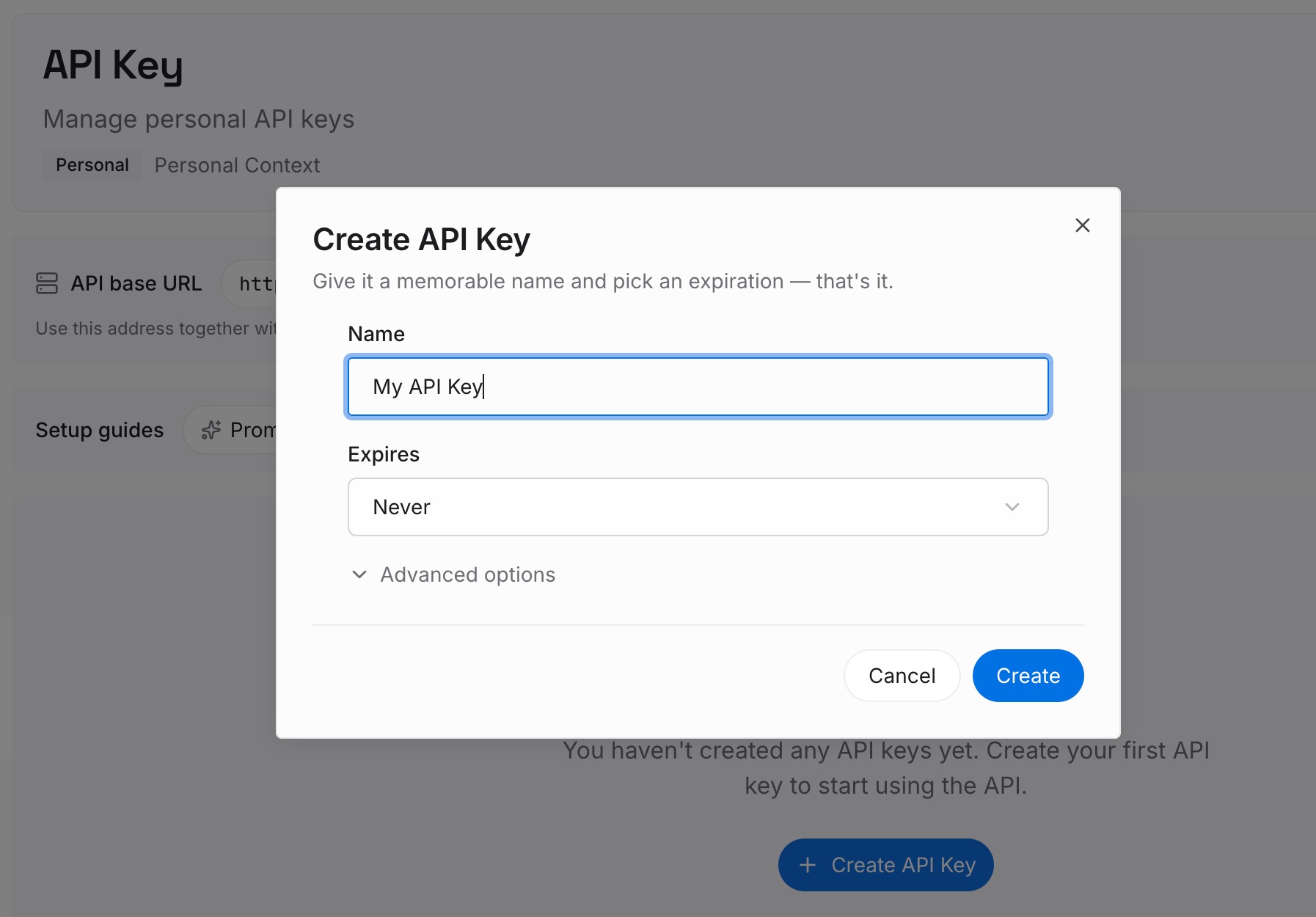
Step 1: Create an API key
Generate a key and make your first request in about 30 seconds. Keep it in your environment or a secret manager rather than pasting it into a chat window.
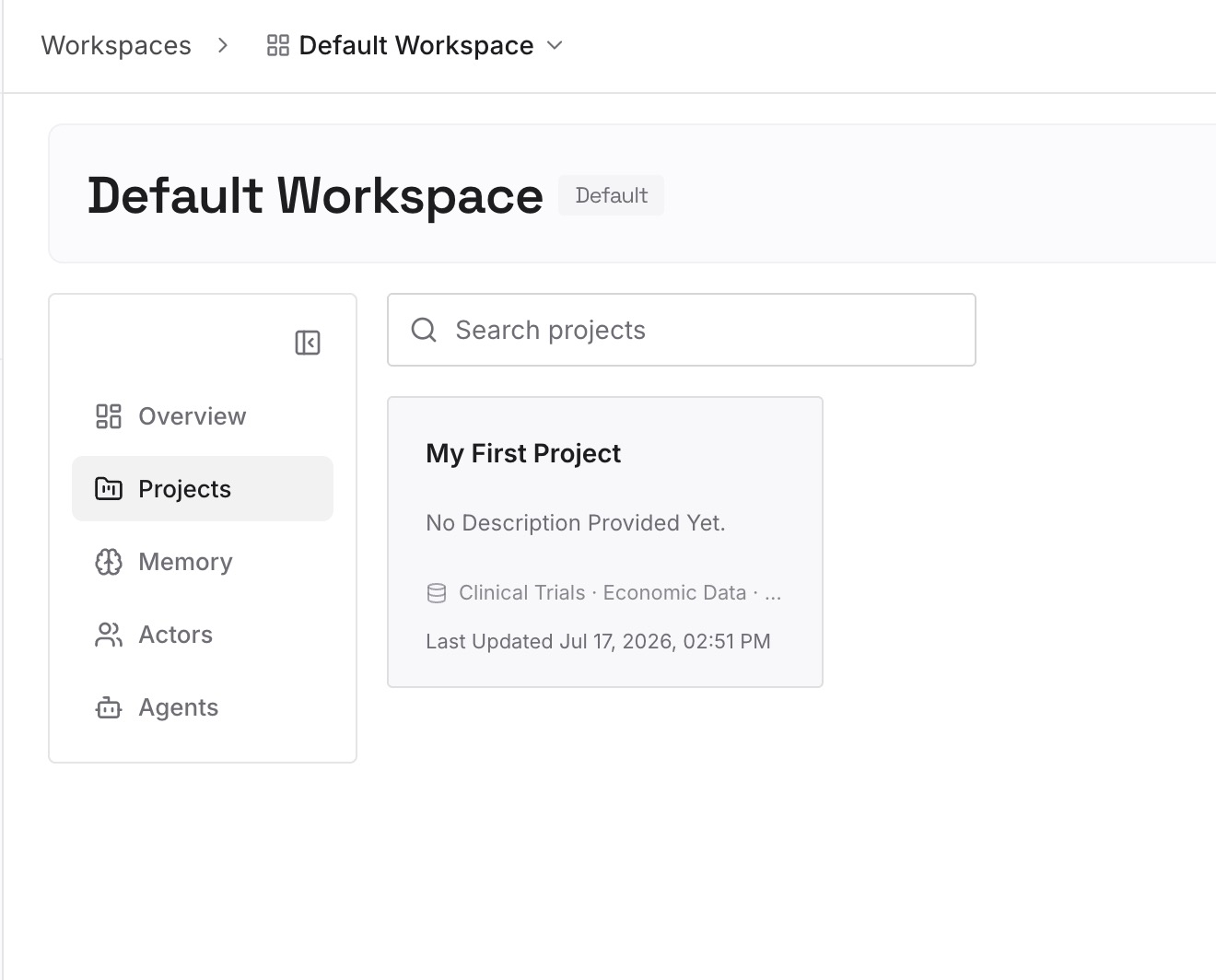
Step 2: Upload your first memories
Drop in the documents, images, and files you'd hate to reconstruct: the runbooks, the vendor quirks, the client requirements, the decisions and their reasons, the research you keep re-finding. Upload the sources rather than summaries — a summary is a derived artifact, and derived artifacts are what you just learned not to depend on.
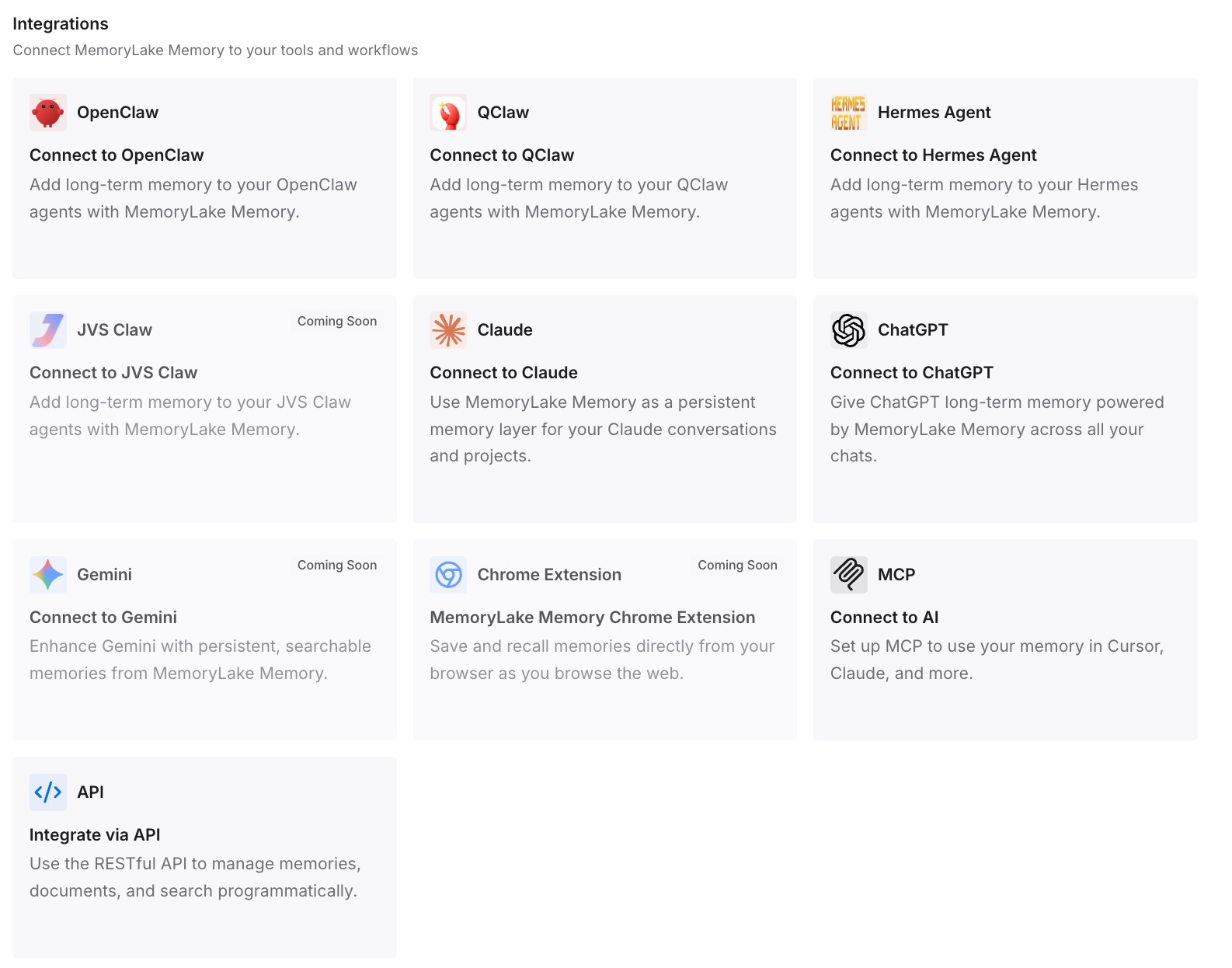
Step 3: Connect your AI & agents
Give Claude, Codex, OpenClaw, and other AI agents access to memory via MCP or the API. ChatGPT has no MCP client, so retrieve what you need through the API and inject it into the prompt, a custom GPT's instructions, or the workflow that calls the model. The point is that no single client owns the store, so no single client's sunset ends it.
What this changes in practice
The first difference is that a shutdown notice becomes an inconvenience. You change which tool reads the store. You don't spend thirty days triaging what's recoverable.
The second is that the knowledge is legible while you still have it. Atlas's Browser memories were, by design, not a list you could read in full — and a store you can't read is a store you can't audit, correct, or copy. Writing things down loses the magic of automatic capture and gains everything else.
The third is that it stops being one product's problem. The same knowledge feeds the assistant you plan with and the agent that writes the code, which is what makes re-explaining your context to every tool stop being a daily tax.
And to be fair to the built-in features: keep using them. ChatGPT memory is good at personalization, and its own boundaries are documented — why it appears not to work is usually one of five documented behaviors rather than a bug. Just don't let it be the only place something important lives.
Best practices for surviving a product sunset
Ask "what's the export format?" before you invest
Not "can I export?" but "into what?" Bookmarks have a format. Memory doesn't. A feature with no interchange format is a feature you're renting, however good it is — and that's fine as long as you know which of your knowledge is sitting in it.
Treat derived memory as a convenience layer, always
Auto-generated memory, in any product, is best understood as a cache in front of things you know. If you'd be upset to lose it, it belongs somewhere else too. That's true of browser memories, chat memories, and a coding agent's local notes alike.
Write down what a tool figured out, on purpose
Once a week, ask the assistant what it thinks it knows about your work, then keep the answers. It takes ten minutes and it converts an unexportable store into a document. Do it before a deprecation email, because after one you're doing it under a deadline — or not at all.
Handle cookies and sessions as credentials
The Atlas article's caution is the right default forever: don't share cookie or session files unless you trust the recipient and understand what access they grant. A session file is a logged-in you.
Keep artifacts in standard formats and standard places
Bookmarks exported as HTML, documents in a filesystem or a store you control, URLs in a document. Boring formats are what survive; proprietary conveniences are what don't.
Conclusion
The Atlas shutdown was handled about as well as these things get: thirty days' notice, a named replacement path in ChatGPT and Codex, step-by-step bookmark migration, an honest security rationale, and an explicit promise that conversation history was separate and safe. Every file-shaped artifact had an answer, even if the answer for cookies was "not importable."
The gap is the derived layer. Browser memories were documented as facts and insights from your browsing, they were coupled to history for deletion, and no export path for them appears anywhere. That's not unique to Atlas — it's the state of every memory feature shipping today. So keep using them, and keep the knowledge that matters in a store with a format and an exit. The tool that learns about you should never be the only thing that knows.