
What changed in v2.1.309
Anthropic's memory documentation now has a troubleshooting entry for this case, titled "Claude ignores the end of my subdirectory CLAUDE.md". It describes the behavior directly: "When a subdirectory CLAUDE.md or a rules file that loads on demand is over a per-file size limit, Claude receives only the start of it. That part ends with a note telling Claude to read the rest with the Read tool, and until Claude chooses to, the later instructions aren't in its context."
The same entry ends with the version line: "Before v2.1.309, Claude Code didn't apply this limit to files that load on demand."
So the change is narrow. The release note describes one thing: a large on-demand file is now delivered in part instead of in full. The rule for the root file is described separately, and it's much larger.
The reason for the limit
The release note gives the reason: sessions were compacting repeatedly after Claude read files under a very large nested CLAUDE.md. A big instruction file that loads when Claude touches a folder can push the session into compaction, then load again the next time Claude works there.
So the limit fixes a real problem. The trade-off is that the end of the file is now what gives way, and the note the documentation describes is addressed to Claude, not to you.
Which files the limit applies to
The documentation lists the files that load on demand and fall under the limit:
- "CLAUDE.md and CLAUDE.local.md in a subdirectory of the directory where you started Claude Code, and the files they import with @path"
- "Rules files in a subdirectory's .claude/rules/"
- "Path-scoped rules in your project's .claude/rules/ or in ~/.claude/rules/"
Two details are easy to miss. Imported files are covered by the same entry. And path-scoped rules are covered even in your project's main .claude/rules/ folder, because they load when Claude works with a matching file rather than at launch.
The files that load at launch work differently. The documentation says the MEMORY.md limit "applies only to MEMORY.md. Claude gets the whole of each CLAUDE.md file that loads at launch, as long as the file is 4 MiB or smaller." It adds that "Claude Code skips a file over 4 MiB and loads none of it." Then it points to the new rule: "Path-scoped rules and CLAUDE.md files in subdirectories have a smaller per-file limit of their own."
So the root CLAUDE.md loads whole up to a very large size, while a CLAUDE.md one folder down loads in part once it passes a much smaller limit.
How big the limit is for your session
The limit depends on the context window your session runs with. The documentation gives these values:
- 200K context window: 40,000 characters
- 1M context window: 200,000 characters on Claude Opus 4.6 and Claude Sonnet 4.6, and 150,000 characters on later models
The unit is characters. Anthropic's sizing advice is in lines ("target under 200 lines per CLAUDE.md file"), and a 200-line file with long lines can still be large.
The window matters too. Several current models run with the 1M window by default, but you can turn that off. Anthropic's model configuration page says "To keep sessions at a 200K window, set CLAUDE_CODE_DISABLE_1M_CONTEXT=1 in your shell or in a settings file." If you or your team set that variable, your sessions use the 40,000-character limit, and a file that loads in full for a colleague on the 1M window can load in part for you. The same applies if you work with a model that runs at 200K.
What Claude actually sees when a file is over the limit
Claude gets the beginning of the file and a note telling it the rest can be read with the Read tool. The later instructions aren't in Claude's context "until Claude chooses to" read them. Whether Claude reads the rest depends on the task in front of it. If the instruction you care about is a convention for test names at the bottom of a long services/payments/CLAUDE.md, and Claude is fixing a bug rather than writing tests, it may have no reason to open the rest.
Three things follow:
- Order inside the file now matters. Content at the top of an over-limit file reaches Claude. Content at the bottom may not.
- Imports add to the size. Anthropic's guidance says imports "help you organize a long file but don't reduce its context cost, because imported files load together with the CLAUDE.md that imports them."
- The note is for Claude. The troubleshooting entry describes a note at the end of the delivered part, telling Claude where the rest is. It doesn't describe a notice to you, and the same entry gives you a way to check the file yourself.
How on-demand files already behaved
The new limit sits on top of loading rules that were already different from the root file.
They load when Claude touches the folder. Claude Code finds CLAUDE.md files in subdirectories under your working directory, and "Instead of loading them at launch, Claude Code loads each one once Claude reads, writes, or edits another file in that subdirectory."
They add up rather than override. Anthropic says "All discovered files are concatenated into context rather than overriding each other." A subdirectory file doesn't replace the root file. It adds to it.
They don't show in the startup list. The troubleshooting section notes that "A CLAUDE.md in a subdirectory of your working directory doesn't appear under Memory files, because it loads on demand rather than at launch. When it loads, a Loaded line with its path appears in the terminal."
Compaction treats them like conversation. The context window page says "Path-scoped rules and nested CLAUDE.md files load into message history when Claude reads, writes, or edits their trigger file, so compaction summarizes them away with everything else." They load again the next time Claude touches a matching file. Its advice: "If a rule must persist across compaction, drop the paths: frontmatter or move it to the project-root CLAUDE.md." Our guide to aiming auto-compact at what you need kept covers that list in full, and our guide to idle compaction covers the case where it happens while you're away.
So an instruction in a subdirectory file can be outside Claude's context for three reasons: Claude hasn't touched that folder yet, compaction summarized it, or it's past the cut.
The same problem in Codex, solved a different way
Codex caps instruction files too. OpenAI's Codex documentation says "Codex skips empty files and stops adding files once the combined size reaches the limit defined by project_doc_max_bytes (32 KiB by default)."
Codex caps the whole chain of AGENTS.md files together, so the files closest to your working directory are at risk. Claude Code now caps each on-demand file separately, so the end of each large file is at risk. Both keep instruction files from crowding out the work, and in both, the last lines go first. Our guide to stopping Codex from skipping your AGENTS.md rules covers the Codex side.
What people try first
Assuming the file is too small to matter. A 200-line file can still pass 40,000 characters if its lines are long, and that's the limit on a 200K window. Count characters, not lines.
Checking /context. Subdirectory files don't appear under Memory files, because they load on demand.
Moving everything into the root CLAUDE.md. That gets past the per-file limit, but the root file loads in every session, and Anthropic warns that "Longer files consume more context and reduce adherence."
Adding a line that tells Claude to read the whole file. If that line is near the bottom of an over-limit file, it's in the part Claude may not receive.
The Fix: Measure the file, put what matters where it loads, then keep the reasons elsewhere
Step 1: Find your on-demand files and count their characters
List the files the limit covers: CLAUDE.md and CLAUDE.local.md files below the folder where you start Claude Code, anything they import with @path, rules files in subdirectory .claude/rules/ folders, and any rules file with a paths: field, in the project or in ~/.claude/rules/.
Anthropic's instruction for the count is short: "In Bash or Zsh, run wc -m path/to/CLAUDE.md to print your file's character count." Compare it with your session's limit: 40,000 characters on a 200K window, and 150,000 or 200,000 on a 1M window depending on the model.
To see which files actually load and when, Anthropic suggests a hook: "Use the InstructionsLoaded hook to log which CLAUDE.md and rules files are loaded, when they load, and why." You can also watch for the Loaded line in the terminal when Claude starts working in a folder.
Step 2: Trim, split, or move the important lines up
For a file over the limit, the documentation gives two options: "trim the file, or move part of it into one or more rules files, which each count against the limit on their own".
Splitting works because each rules file has its own limit. A 60,000-character api/CLAUDE.md can become a shorter CLAUDE.md plus two rules files scoped to the paths they're about. Each loads when Claude touches a matching file and stays under the limit.
Put the rules that matter most near the top of each file, so the top still reaches Claude if the file grows later. Anthropic gives the same advice for skills, which are cut from the end after compaction: "Truncation keeps the start of the file, so put the most important instructions near the top of SKILL.md."
Two built-in tools help with trimming. /doctor prompt-audit looks for "instructions written for older models, references to files or commands that don't exist, and files that contradict each other", and proposes edits without changing anything until you ask. In large monorepos where other teams' files get picked up, claudeMdExcludes lets you skip specific CLAUDE.md files by path or glob pattern.
Step 3: Keep the background out of the instruction file
Anthropic's own trimming tool shows what belongs in the file. The /doctor checkup "cuts content Claude can derive from the codebase, such as directory layouts, dependency lists, and architecture overviews, and keeps pitfalls, rationale, and conventions that differ from tool defaults." So a one-line reason next to its rule stays.
What can go is the long history: the full story of why the payments service retries twice, which migrations were abandoned, who argued for the test layout. Move it into a decisions document or the pull request that introduced the rule. For procedures that matter only for some tasks, Anthropic points to skills: "For task-specific instructions that don't need to be in context all the time, use skills instead, which only load when you invoke them or when Claude determines they're relevant to your prompt." The file gets smaller, and the history is still written down.
Setting this up in MemoryLake
The new limit makes a point the documentation already made in other places: an instruction file is a place for short rules, and Claude receives it under conditions. It loads when Claude touches a folder, it's summarized by compaction, and now it's cut when it's long. The long background behind your rules is what gets squeezed out first.
MemoryLake is a memory layer for keeping that background in one list you maintain, available to Claude Code and the other assistants you connect, such as ChatGPT and Codex.
You write the entries yourself, in your own words. Nothing is read out of, written to, or deleted from your CLAUDE.md files, your rules files, your auto memory folder, or any vendor's store. For work repositories, follow your organization's policy on what you keep outside them.
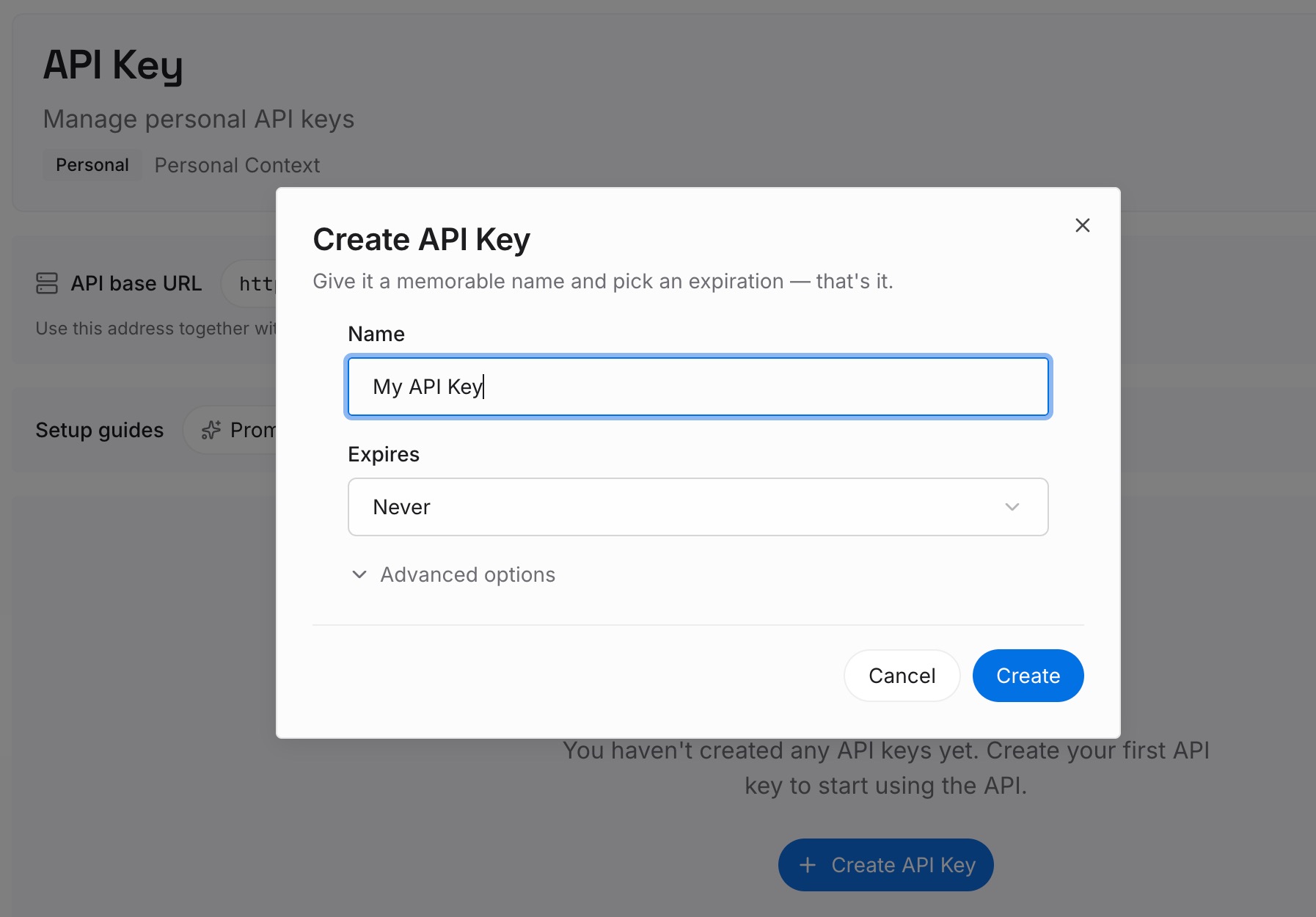
Step 1: Create an API key
Sign in and generate a key from the dashboard. The key belongs to your MemoryLake workspace and is separate from your Anthropic account.
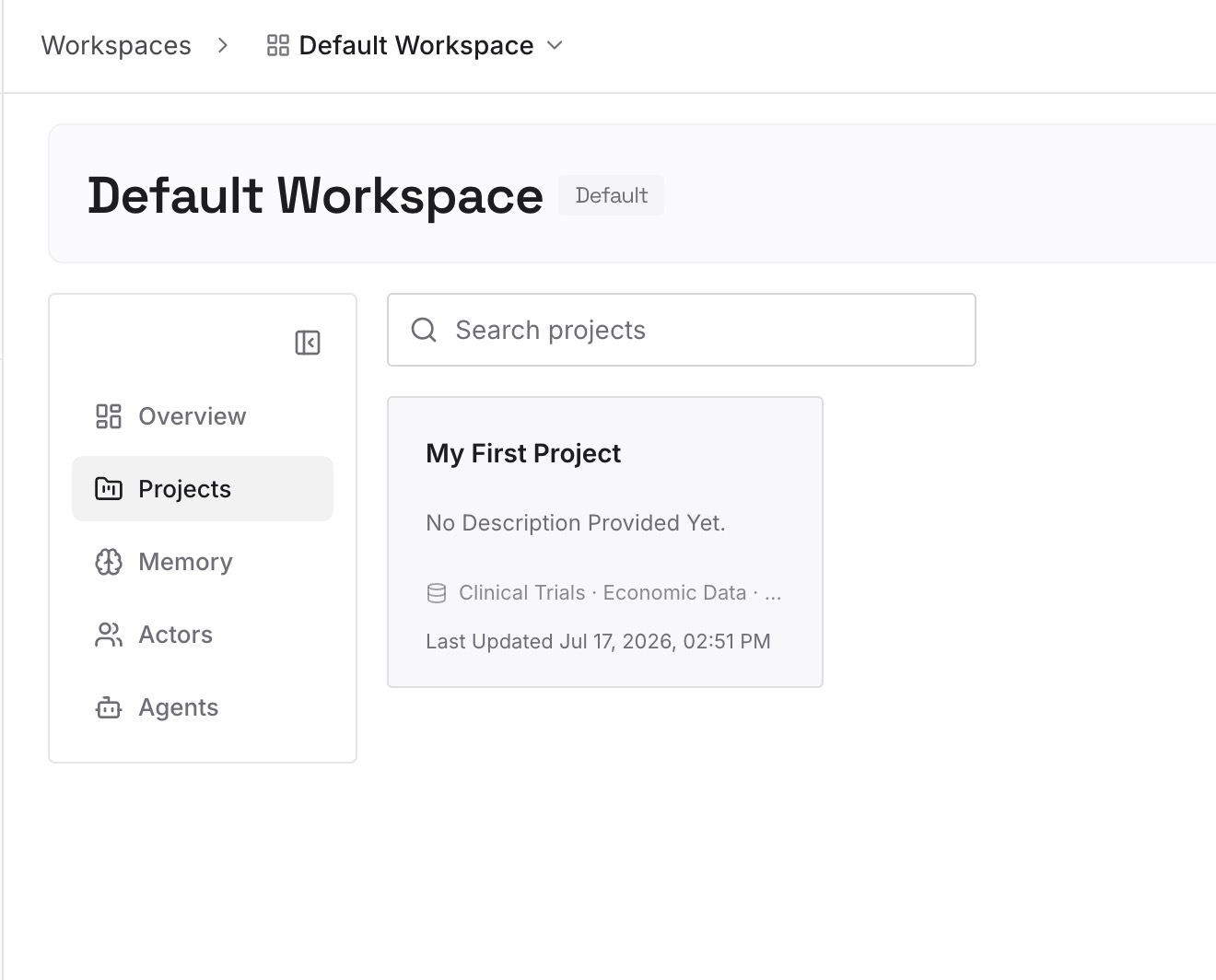
Step 2: Upload your first memories
Start with what you moved out of your instruction files in Step 3 of the fix: the history behind rules, the abandoned approaches, the decisions about a service. One point per entry, dated, and labeled with the folder or service it applies to.
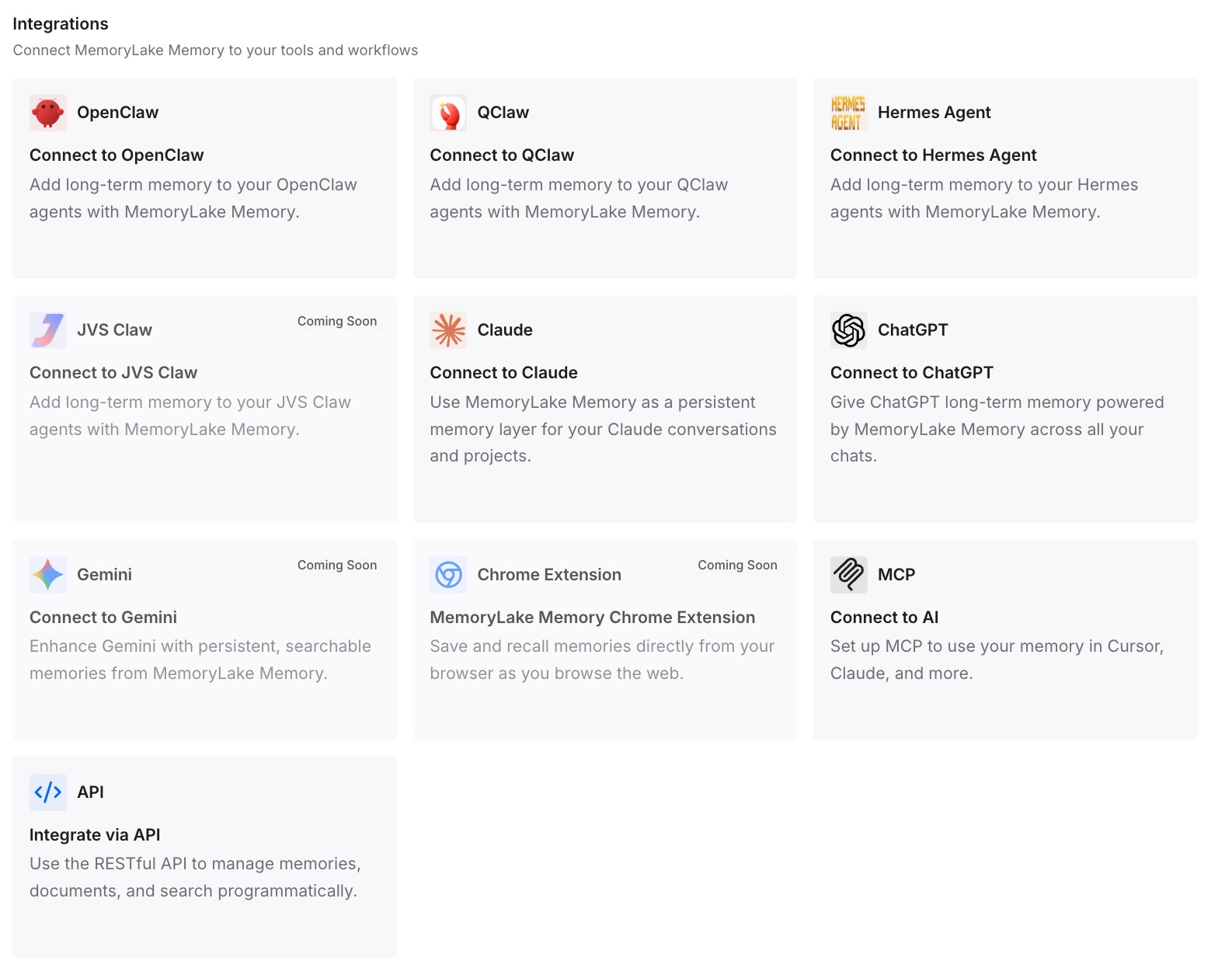
Step 3: Connect your AI & agents
Connect Claude Code and the other assistants you use. The background is available when a task needs it, and your CLAUDE.md files stay short enough to load in full.
What this changes in practice
The first difference is that you know which of your files the change touched, because you've counted them against your session's limit.
The second is that the rules you care about reach Claude. They sit near the top of short files or in scoped rules files, so a growing file doesn't push them past the cut.
The third is that your instruction files stop doing two jobs. Rules stay in CLAUDE.md, and the history behind them lives somewhere else. If you also keep an AGENTS.md for other tools, our guide to how Claude Code reads AGENTS.md covers which file wins.
Best practices for subdirectory CLAUDE.md files
Count characters. The limit is 40,000 characters on a 200K window and 150,000 or 200,000 on a 1M window.
Check the window your session uses. CLAUDE_CODE_DISABLE_1M_CONTEXT=1 and 200K models put you on the lower limit.
Put the most important rules first. If a file grows past the limit, the start is what Claude receives.
Split into scoped rules files. Each rules file counts against the limit on its own.
Keep long histories out of instruction files. A one-line reason can stay. The full story belongs where it doesn't compete for context.
If you work in several worktrees, our guide to what each worktree session loads covers how instruction files and auto memory behave there.
Conclusion
Claude Code v2.1.309 added a per-file size limit for instruction files that load on demand: subdirectory CLAUDE.md and CLAUDE.local.md files, their imports, rules in subdirectory .claude/rules/ folders, and path-scoped rules. A file over the limit reaches Claude as its start plus a note, and the rest stays out of context until Claude reads it. The project-root CLAUDE.md still loads in full up to 4 MiB.
Count the characters in your on-demand files, compare them with the limit for your context window, and split or trim the ones that are over. Put the important rules first, and move the long background somewhere it doesn't have to fit.