
Why a good knowledge base still goes unread
The question and the answer live in different applications
This is the whole thing, and it is mundane. A question is a social act performed in a chat client. Consulting documentation is a solitary act performed in a browser tab. Asking a colleague costs one message; checking the wiki costs a context switch, a search, and the risk of finding nothing.
Teams close that gap with links — pinned messages, a channel bookmark, a bot posting the handbook URL weekly. Each still ends at "now go read this." The switch is intact.
A document answers a page, not a question
Even a well-maintained knowledge base returns documents. The reader does the extraction: skim the page, locate the paragraph, decide whether it is still current, translate it into an answer for the case in front of them.
That step is invisible in planning and enormous in practice, and it is why "we have that documented" coexists so comfortably with the same question arriving monthly. The information is present; the answer is not assembled. Retrieval and memory are not the same operation, the distinction drawn in why RAG isn't memory.
Your chat platform's search is scoped to your chat platform
Slack has invested here and it works, within a documented boundary. Its AI features are, in Slack's words, "backed by the knowledge in your workspace." Answers are "based on relevant information in Slack, rather than sifting through search results," and they "include citations that refer to the source messages or files that informed them."
Two documented constraints matter when your knowledge lives elsewhere. Availability is by plan — automatic search filters are listed from Pro upward, while Search answers appears on Business+ and Enterprise+. And the corpus is your own reachable content: "AI-generated responses only include information available to you (like messages and other content from public channels, and any private channels and direct messages you belong to)."
Reaching outside is a distinct capability: "If you're on the Enterprise+ plan, an Org Owner or Admin can enable enterprise search to include content and information from other sources (like Google Drive, GitHub, and more) in search results." That is a sensible design and it is also the answer to why the assistant in your chat app cannot quote the runbook that lives in your document system.
The material shared in chat is the most contextual and least durable
The most useful artefacts in most workspaces get pasted into chat: the error screenshot, the signed PDF, the spreadsheet someone rebuilt at midnight. Slack counts those inside the same history window — "Files include things like clips, PDFs, documents, images, screenshots, and audio and video files" — and on the free version, "You can view and search messages and files from the last 90 days," with data "more than one year old" deleted.
So the richest layer of your team's knowledge sits in the least permanent place you own, and no wiki update captures it, because nobody thinks of a pasted screenshot as documentation.
Everyone's private assistant has a private context
The workaround people reach for is their own AI subscription: paste in the background, get an answer. It works once, for one person. The context stays in an individual account, so nothing accumulates anywhere shared — the split described in cross-tool memory for knowledge workers, and at organisation scale in enterprise AI forgetting.
What teams try
Pinning the handbook link in every channel. Cheap, and it still ends at a context switch. Pins also become a curated list nobody curates.
A #handbook or announcements channel. Turns the knowledge base into a feed, and feeds are read once, on the day of posting, by whoever was online.
A search bot over chat history. Useful, and bounded to chat: it cannot answer from a document that was never posted.
Buying everyone a personal AI subscription. Solves individual throughput and leaves team knowledge where it was. Support teams feel this sharply — the pattern in when an assistant forgets your support tickets.
Appointing a knowledge owner. Sometimes right, and it concentrates the failure into one person's calendar rather than removing it.
The Fix: Let the Knowledge Base Answer Where the Question Is Asked
The reframe: stop trying to move people to the knowledge base and move the knowledge base to the group chat. Concretely, that means a bot in the channel that answers from a designated body of memory — not from a general-purpose model's generic knowledge — and that writes each exchange back into the same place.
That second half is what separates this from a search box with a chat interface. In MemoryLake's IM connection, the exchanges become memory, so the corpus grows from the questions your team actually asks rather than from a documentation sprint someone has to schedule. Setup is three steps, and the platform differences are all in step two.
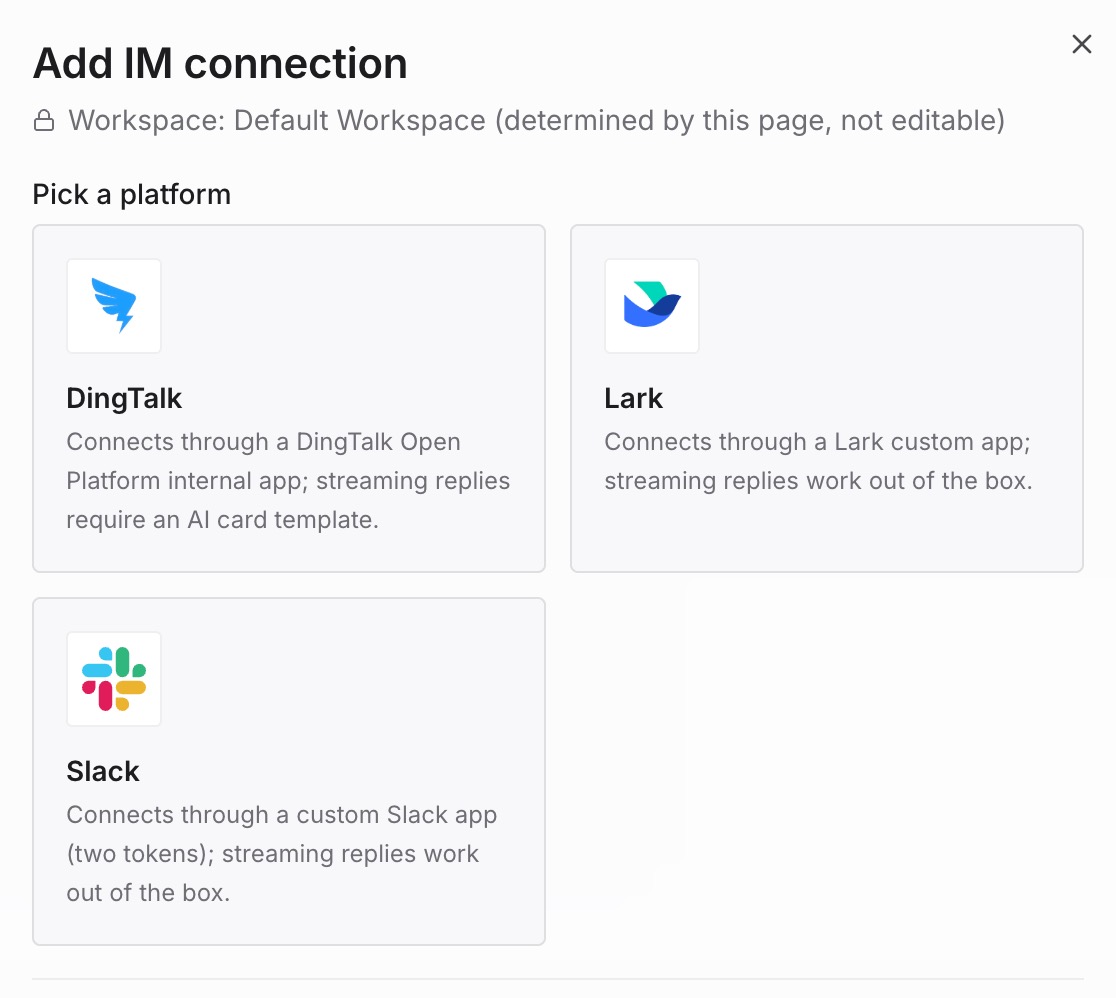
Step 1: Add IM connection
In the console, open MemoryLake → Workspaces, open the workspace whose memory you want to expose, switch to the IM tab, and pick your platform. Two prerequisites before you begin: you need the owner or admin role on the team, since members "can neither see nor change integrations," and the workspace needs at least one project plus an agent linked to it.
Step 2: Enter the app credentials
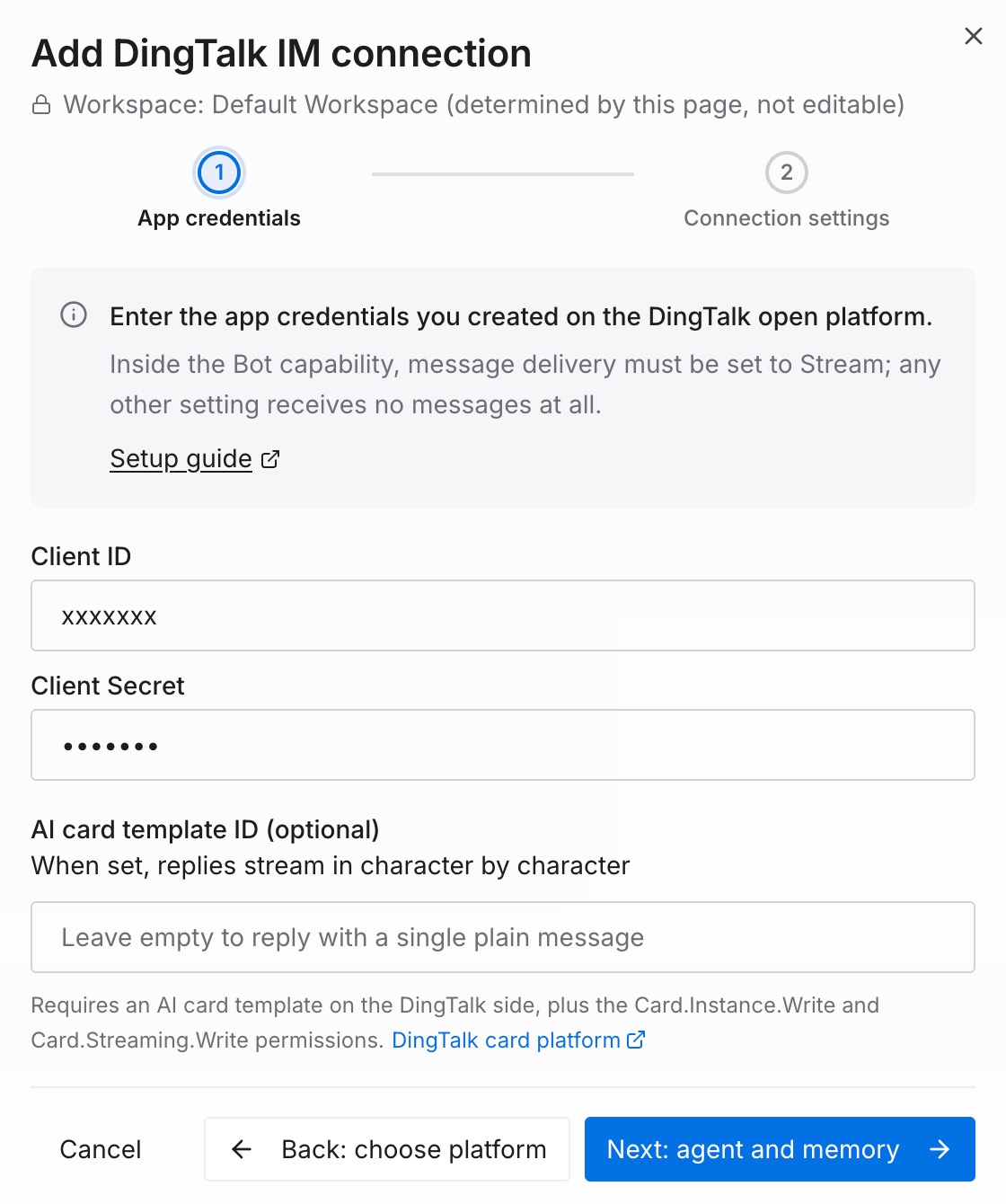
Each platform issues a different pair, and each has a different approval reality. This is the part worth planning around.
| Platform | What you paste | What it costs you administratively |
|---|---|---|
| Slack | Bot User OAuth Token (xoxb-) + App-Level Token (xapp-) | Nothing to review. The docs state it directly: "Nothing on the Slack side requires a review cycle — one person can finish the setup in about ten minutes." |
| Feishu | App ID (cli_) + App Secret | Administrator rights, and "publishing a version requires admin review." Scopes are inert until then: "Permissions only take effect once a version has been published and approved." |
| DingTalk | Client ID + Client Secret | DingTalk administrator rights, because you create the app, request permissions and publish it. |
Two notes that save real time. On Slack, creating the app from a manifest configures scopes, event subscriptions, the DM entrance and Socket Mode in one paste — and any later change to scopes or events needs a Reinstall to Workspace before it takes effect. On DingTalk there is an optional third field, an AI card template ID: leaving it empty means one message per answer, while setting it gives character-by-character streaming.
One naming trap worth catching before you request anything: "Feishu and Lark are two separate platforms." Feishu is the China edition, Lark the international one; accounts and apps do not carry across, and which one a given deployment talks to is a deployment-level setting rather than a per-integration choice. Confirm that with your admin before an app gets created in the wrong console.
Step 3: Create and connect
Choose the agent that answers messages from the chat side, then set the memory scope: one required read-write project the bot retrieves from and writes into, plus any number of read-only projects it may search but never write to.
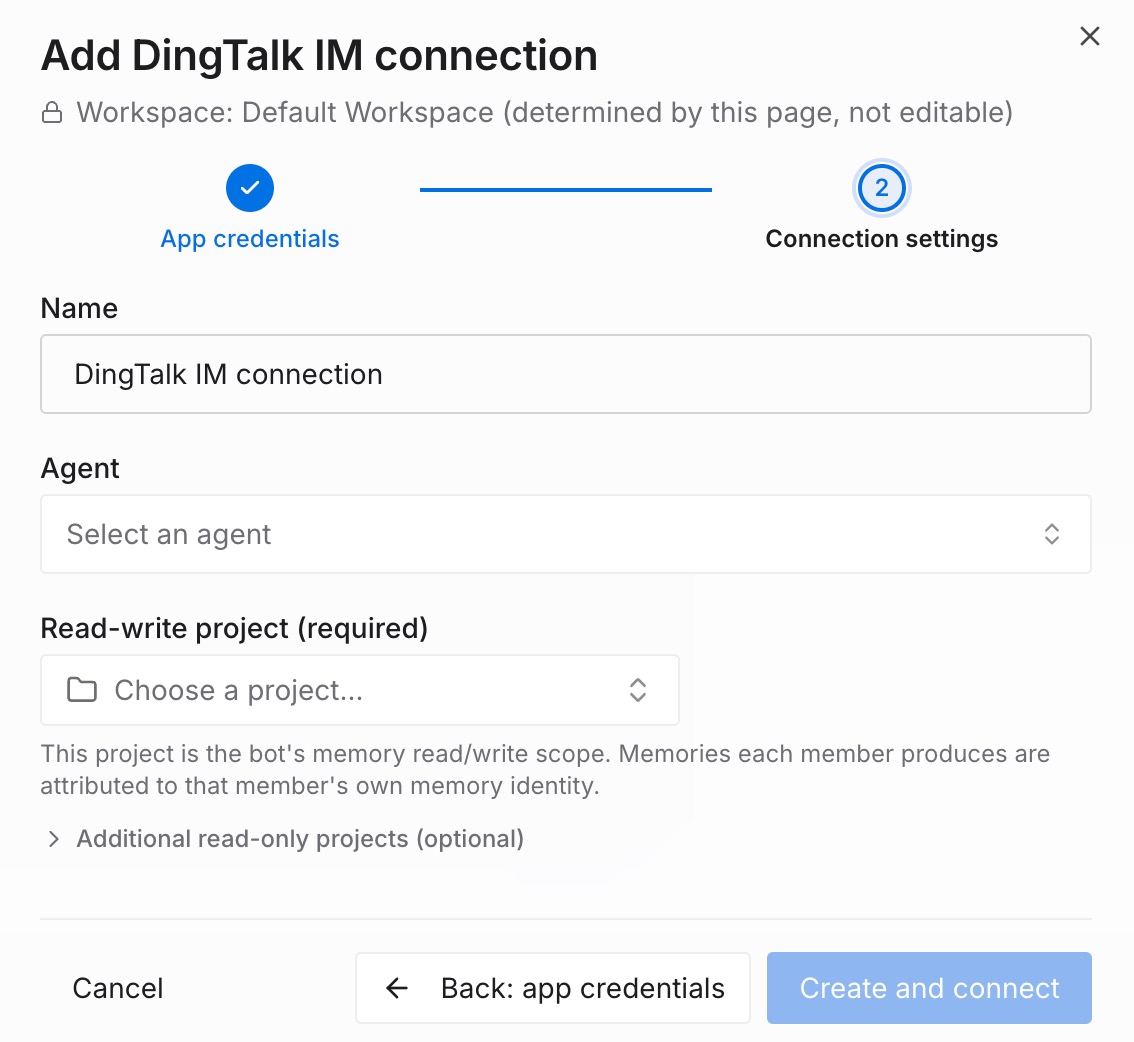
Treat that as the security decision it is. The documentation says so outright — "The read-write project is an authorization decision" — because everyone who can reach the bot both writes into that project and can read what is already in it. Point it at a project you meant to share with the team, not the one holding sensitive material. Then create the integration and confirm the card shows Connected.
Three honest limits. The bot does not read your chat history: on every platform it only receives messages that mention it, so it cannot see other conversations in the channel or group. It answers from the project you connected, which means the quality of week one is the quality of what you loaded. And it is context rather than enforcement — for anything that must be true, a policy or a check is the guarantee, not a memory layer.
What differs by platform once it is running
The mechanics diverge in ways that surprise teams on day one.
Getting the bot's attention. In group chats all three require an @-mention — unmentioned messages are never delivered. DMs differ: on Slack, members find the app under Apps in the sidebar and ask with no @ needed; Feishu DMs are governed by the app's availability scope; DingTalk's integration is documented around group use.
Where the answer appears. Slack replies in a thread under your question, keeping a busy channel readable. Feishu quotes your message and @-mentions you back, which is what stops the answer getting lost in a fast group.
How answers stream. Feishu streams word by word. Slack streams by editing the same message in segments — the (edited) marker is expected, and the refresh rate slows after roughly the first twelve seconds. DingTalk sends one message per answer unless you supplied an AI card template ID.
Sending a file or a screenshot. Slack needs the file and the mention in one message: "A file posted to a channel on its own (without a mention) never reaches the bot — Slack does not deliver it." Feishu's documented path for a group document is to post the file, then reply to that message and @-mention the bot. DingTalk takes @bot plus text plus image as a single rich-text message.
How long context lasts. Slack channels are per-thread with no expiry — returning to the same thread a day later still works. Feishu and DingTalk groups are topic-scoped: after 8 minutes of silence the next question starts a new topic, and that window stretches to 30 minutes right after a file or screenshot so follow-ups about the same image keep working.
Starting over. On Feishu and DingTalk, send /new. On Slack the reset word has no slash — the client intercepts anything starting with / as a slash command, so it is new on its own in a DM, or @bot new inside a thread.
Who is allowed in. Access is decided on the chat platform's side, not by a second allowlist. Slack Connect users from external organisations are silently ignored — no quota use, no memory writes. DingTalk handles messages only from members of your own organisation. On Feishu, DMs follow the app's availability scope and groups follow group membership.
Privacy inside a group. On all three, conversation context is per-person: in the same group or thread, one person's exchange never appears in another's. Project memory is shared, which is the point of connecting it at all.
Best practices for a knowledge base that answers
Connect a project, not everything you own. Start with one project scoped to what the team should collectively know, and add read-only projects for material the bot may cite but never modify.
Seed it with the questions you already answer, not your document library. Twenty recurring questions with their answers and reasons beat two hundred pages, because the reason is what survives when specifics change.
Write one claim per entry. Short, self-contained entries retrieve cleanly. Long documents get returned in full and push the extraction work back onto the reader — the same failure the wiki had.
Pick the platform you actually live in. The integration is worth nothing if questions arrive somewhere else. A perfect Slack setup is dead weight in a company that runs on DingTalk.
Tell people the two rules on launch day. Mention the bot every time, including thread replies, and attach files in the same message as the mention. Nearly every "it ignored me" report traces back to one of those.
Ask an admin first on Feishu or DingTalk. Both need publishing and permission review, so a request submitted Monday is not a bot running Monday. Slack is the one you can finish yourself in an afternoon.
Keep judgement with people. The bot returns what the team has established; what to do about a case nobody documented is still a human call. That boundary is drawn in what AI memory actually is.
Conclusion
A knowledge base fails at the point of use, not the point of writing. Questions get asked in group chat because that is where colleagues are, and documentation asks people to leave that window, search, and assemble an answer themselves. Chat platforms have closed part of the gap — Slack's AI answers work well over Slack content, on the plans that include them, for the content each person can access — but knowledge living in documents rather than messages falls outside that scope unless you are on the tier that reaches external sources.
Putting the knowledge base behind an @-mention removes the context switch and the assembly step together, and writing each exchange back means the corpus grows from real questions instead of a documentation sprint. The setup is short; the parts to plan are administrative. Decide who can approve an app on Feishu or DingTalk, and which project you are comfortable making readable to everyone who can reach the bot. Get those two right and the wiki stops being something people are asked to read.