
Why ChatGPT stops following your custom instructions
1. The customization toggle is off
The unglamorous answer, and it happens more than people admit — a settings reset, a new device, a workspace change. Custom instructions only apply when the toggle is on, and OpenAI's setup steps name it explicitly.
On Web and Desktop: Settings, then Personalization, make sure Enable customization is toggled ON, and your text is in the Custom Instructions field. On iOS and Android the path is Settings, then Customize ChatGPT, same toggle, same field. The feature is available "on all plans on Web, Desktop, iOS, and Android," so this isn't a plan problem — it's a switch.
Check this first. It costs fifteen seconds and it's the single most common cause.
2. You're inside a custom GPT
This one catches careful people, because everything looks configured correctly. OpenAI's help center states it plainly under the GPTs FAQ "Do GPTs use memory or custom instructions?": "GPTs do not use saved memory, custom instructions, or previous conversations. Each conversation starts fresh."
So the moment you open a custom GPT — yours or someone else's — your personal instructions stop applying. That's deliberate: a GPT is a shareable configuration, and inheriting whoever's personal settings happen to be running it would make its behavior unpredictable and leak personal context into a shared surface. But it means "ChatGPT ignores my instructions" is expected behavior in that specific place, and no amount of rewriting the instructions will change it. If the GPT needs your preferred format, that has to be written into the GPT's own instructions.
3. You exceeded the character limit
Custom instructions have a hard, documented ceiling, and it's smaller than most people assume: "Free and Go users can save up to 1,500 characters in custom instructions. Plus, Pro, Enterprise, Business, and Education users can save up to 5,000 characters."
Fifteen hundred characters is roughly two paragraphs. If you've been adding a line every time something annoyed you, you've likely hit the wall — and the practical experience of hitting it is that your newest, most specific instruction is the one that didn't fit. Open the field and count. This is also why the instructions field can't be your knowledge base, only your preference sheet.
4. You told ChatGPT in chat instead of in the field
This is the biggest conceptual mix-up, and it's worth being precise about, because the two systems behave differently on purpose.
Custom instructions are prescriptive. You declare them, they're stored verbatim in a field you can read, and they apply to every chat.
Memory is descriptive. OpenAI describes it as "a continually updated synthesis of context from your past chats" — the model noticing patterns rather than recording your commands. And the docs are candid that you can't fully audit it: the memory summary "will not include everything that ChatGPT remembers based on your chats," with the recommendation that "If you want to know if ChatGPT has remembered something, just ask in chat."
So when you type "from now on, skip the preamble" mid-conversation, that's a request that may or may not become part of a synthesis. OpenAI's own guidance is that explicit directives belong in Custom Instructions. If the behavior you want is non-negotiable, the field is where it goes — not the chat. Broader boundaries of the memory side are covered in ChatGPT memory limitations, and the diagnostics in what to do when ChatGPT memory isn't working.
5. You're looking at an old conversation's record, not current behavior
Two documented statements sit close together here and they're easy to conflate.
Settings changes apply immediately, including to conversations already open. But separately, the FAQ answers "If I update or remove my custom instructions, will previous versions of my instructions continue to appear in my chat history?" with: "Yes, updates to your instructions are reflected only in future conversations. To remove custom instructions from previous conversations, you can clear those conversations from your chat history."
Read together: the application of your current instructions is immediate, while the record of the older instruction text stays attached to the past conversations where it was used. If you're auditing an old thread to check whether your new instruction took effect, you're looking at the wrong evidence. Test in a new chat.
6. The instruction is vague, or it contradicts another one
The remaining case, and the only one that's genuinely about model behavior rather than configuration. "Be concise" is an aspiration; "keep answers under 150 words unless I ask for detail" is testable. "Explain your reasoning" and "no preamble" pull in opposite directions, and when instructions conflict, something has to lose.
There's a documented hint that adherence is calibrated rather than absolute. OpenAI notes that information from your use of custom instructions is used to improve model performance — "like teaching the model how to adapt its responses to your instructions without overdoing it." Instruction-following is tuned to be sensible, not literal. So write instructions that survive sensible interpretation: specific, mutually consistent, and few.
What people try
Rewriting the instructions in stronger language. ALL CAPS, "you MUST." Occasionally shifts things at the margin. Does nothing for causes one through five, which is most of them.
Adding more instructions. The reflex that leads straight into the character ceiling, and dilutes the rules you actually care about along the way.
Repeating the instruction at the top of every conversation. It works, and it's the tax this whole feature exists to remove. It also means the preference lives in your habits rather than anywhere durable — the pattern described in stopping re-explaining context to your AI.
Putting project knowledge in the instructions field. Understandable, since it's the one place you know gets read. With 1,500 or 5,000 characters, it fails immediately — and the knowledge you most need is exactly what gets truncated.
Assuming memory will pick it up. Sometimes it does. It's a synthesis you can't fully enumerate, so "sometimes" is the ceiling. Fine for preferences you'd merely like; wrong for rules you require.
The Fix: Put Rules in the Field and Knowledge in a Memory Layer
The stable setup separates two things people cram into one box.
Rules about how ChatGPT should behave go in Custom Instructions: short, testable, mutually consistent, well inside the character limit. Turn the toggle on, keep the list to the handful you'd actually defend, and test changes in a new chat.
Knowledge about your work doesn't belong there at all. It's too large for the field, it changes too often, and it's the part you need available in other tools too. That's what MemoryLake is for: a memory layer your assistants read from, so the instructions field can stay a preference sheet. Setup is three steps.
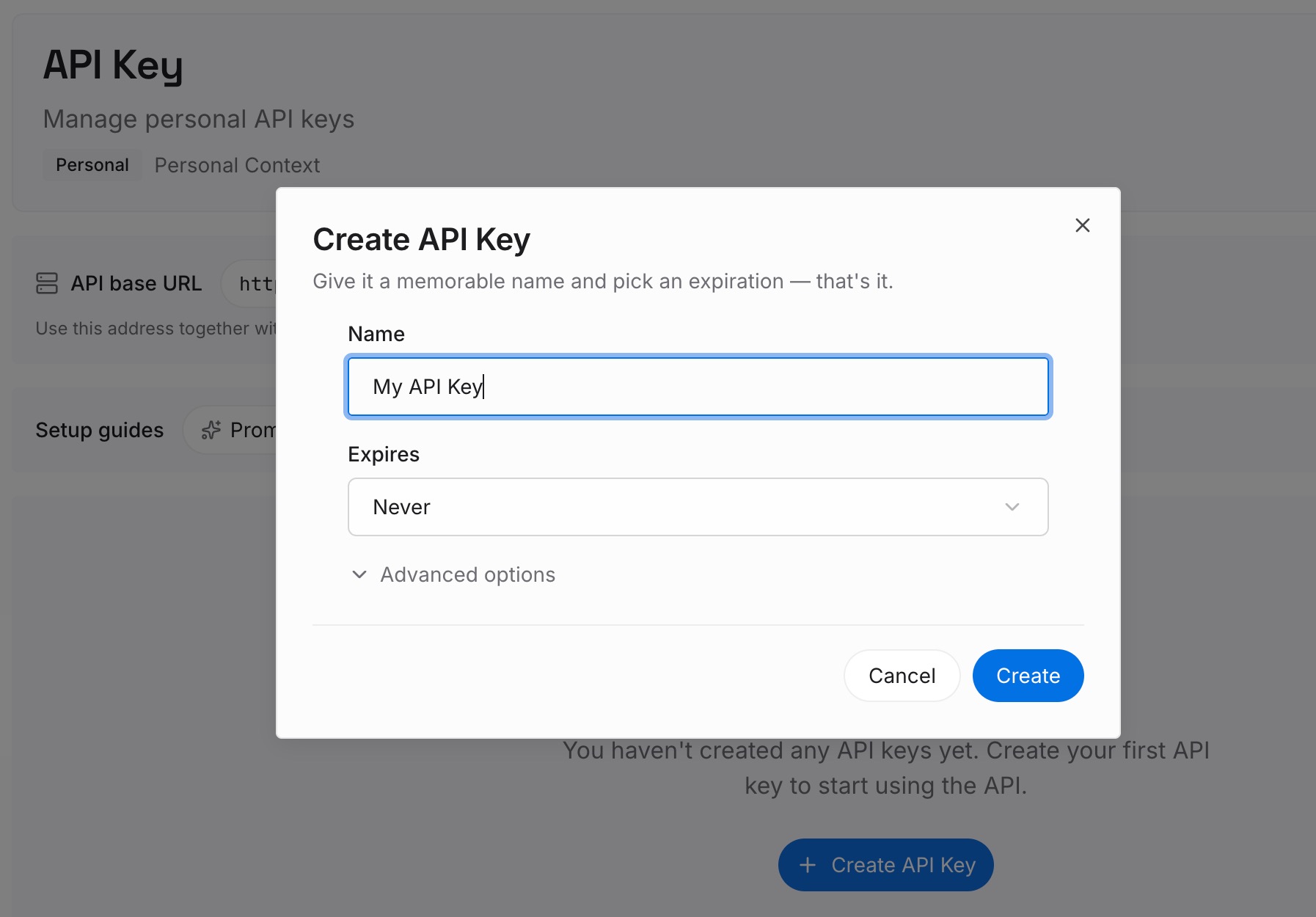
Step 1: Create an API key
Sign in to MemoryLake and create an API key. One credential across the tools you connect, independent of any single assistant's settings screen.
Step 2: Upload your first memories
Move the project knowledge out of the instructions field: how your work is structured, the constraints that aren't obvious, decisions and the reasoning behind them, what you tried and rejected. Keep entries short and single-topic. Then trim the instructions field down to genuine behavior rules — you'll usually find it drops by half, and the remaining rules get followed more consistently as a result.

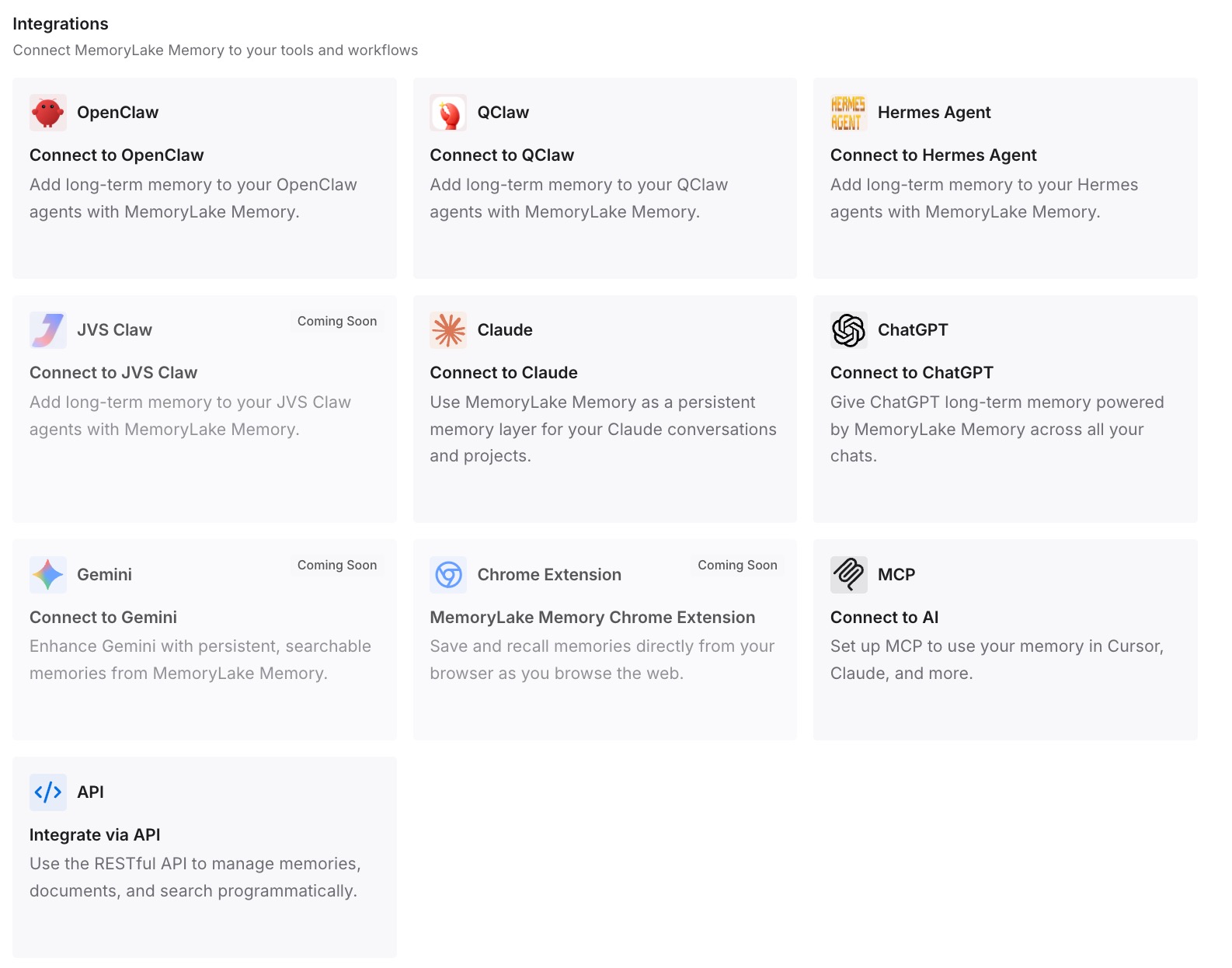
Step 3: Connect your AI & agents
Connect your tools. MemoryLake is reachable over MCP and over an API, so MCP-native agents — Claude Code, Codex, and OpenClaw among them — connect by pointing at the MCP server, and other assistants read the same memory through the API. The instructions field keeps doing its narrow job; the knowledge stops competing with it for 1,500 characters.
Two honest limits. A memory layer doesn't change how custom instructions work — if the toggle is off or you're inside a GPT, that's still the answer, and no external layer overrides it. And it isn't enforcement: instructions shape behavior rather than guarantee it, in every assistant.
What this changes in practice
Diagnosis takes two minutes. With a short, current instructions list, checking whether a rule is present is a glance. With 5,000 characters of mixed rules and background, it's an investigation.
Adherence improves by subtraction. Fewer, non-conflicting instructions are followed more reliably than a long list. This is the counterintuitive part: deleting text usually gets you more compliance, not less.
The character limit stops being a cliff. When knowledge lives elsewhere, you're never one useful instruction away from the ceiling.
Your preferences follow you across tools. Custom instructions are ChatGPT-only, with no API — OpenAI states "There will be no API for custom instructions, as the Chat Completions API system messages should be used for a similar effect." A memory layer is where the cross-tool half lives.
GPTs become usable for real work. Once you know GPTs don't read your personal instructions or memory, you stop fighting it and give the GPT its own instructions plus a live source of knowledge instead.
Best practices for custom instructions that hold
Check the toggle before anything else. Settings → Personalization on Web and Desktop, Settings → Customize ChatGPT on mobile. Enable customization must be on.
Test in a new chat, always. Old threads carry the record of the instructions that were in effect when they happened. A new chat is the only clean test.
Count your characters. 1,500 on Free and Go, 5,000 on Plus, Pro, Enterprise, Business, and Education. Know where you stand before adding another line.
Write testable rules. "Under 150 words unless I ask for more" instead of "be concise." A rule you could grade is a rule a model can follow.
Remove contradictions on sight. Two instructions pulling opposite ways means one loses arbitrarily. Decide which you meant.
Remember the export path. Custom instructions are included in your ChatGPT data export — the FAQ answers "Are custom instructions included in my ChatGPT data export? Yes." Worth knowing before you rewrite a set you spent months tuning.
Don't expect them inside GPTs. They don't apply there, by design. Anything a GPT needs goes in that GPT's configuration.
Keep organization-level rules out. If you're encoding company-wide standards rather than personal preferences, that's a different job — closer to making ChatGPT remember your brand guidelines than to a personal settings field.
Conclusion
Custom instructions are one of the few features in this space with no ambiguity in its documentation: applied immediately, to all chats, on every plan and platform. So when the behavior disappears, the cause is somewhere else — the toggle, a custom GPT, the character ceiling, the wrong system, an old thread you're using as evidence, or an instruction too vague to act on.
Work down that list and you'll fix it, usually in the first two items. Then keep the field small on purpose: rules about behavior in the field, knowledge about your work in a layer that isn't capped at 1,500 characters. That's the version of this feature that keeps working six months from now. If your specific frustration is the diagnostic side rather than the fix, why ChatGPT forgets your custom instructions covers the mechanism in more depth, and why ChatGPT forgets project context covers the adjacent case.